> For the complete documentation index, see [llms.txt](https://docs.archisketch.com/llms.txt). Markdown versions of documentation pages are available by appending `.md` to page URLs; this page is available as [Markdown](https://docs.archisketch.com/guide/user-jp/make-project/search-home.md).
# 自宅を検索する
ダッシュボード内のプロジェクトでプロジェクトを作成してみてください!
[新しいプロジェクト]ボタンは2つとも同じ機能なので、使いやすい方をクリックして始められます。

アーキスケッチでは、3つの方法でプロジェクトを作成できます:
* 自宅を検索する
* 図面画像をアップロードする
* 図面を直接描く
## 自宅を検索する
まず、[新しいプロジェクト]ボタンをクリックすると、2つのオプションが表示されます。
自宅がマンションに該当する場合は、[自宅を検索する]を選んで検索を始められます。

[自宅を検索する]をクリックすると、新しい図面検索ページに移動します。\
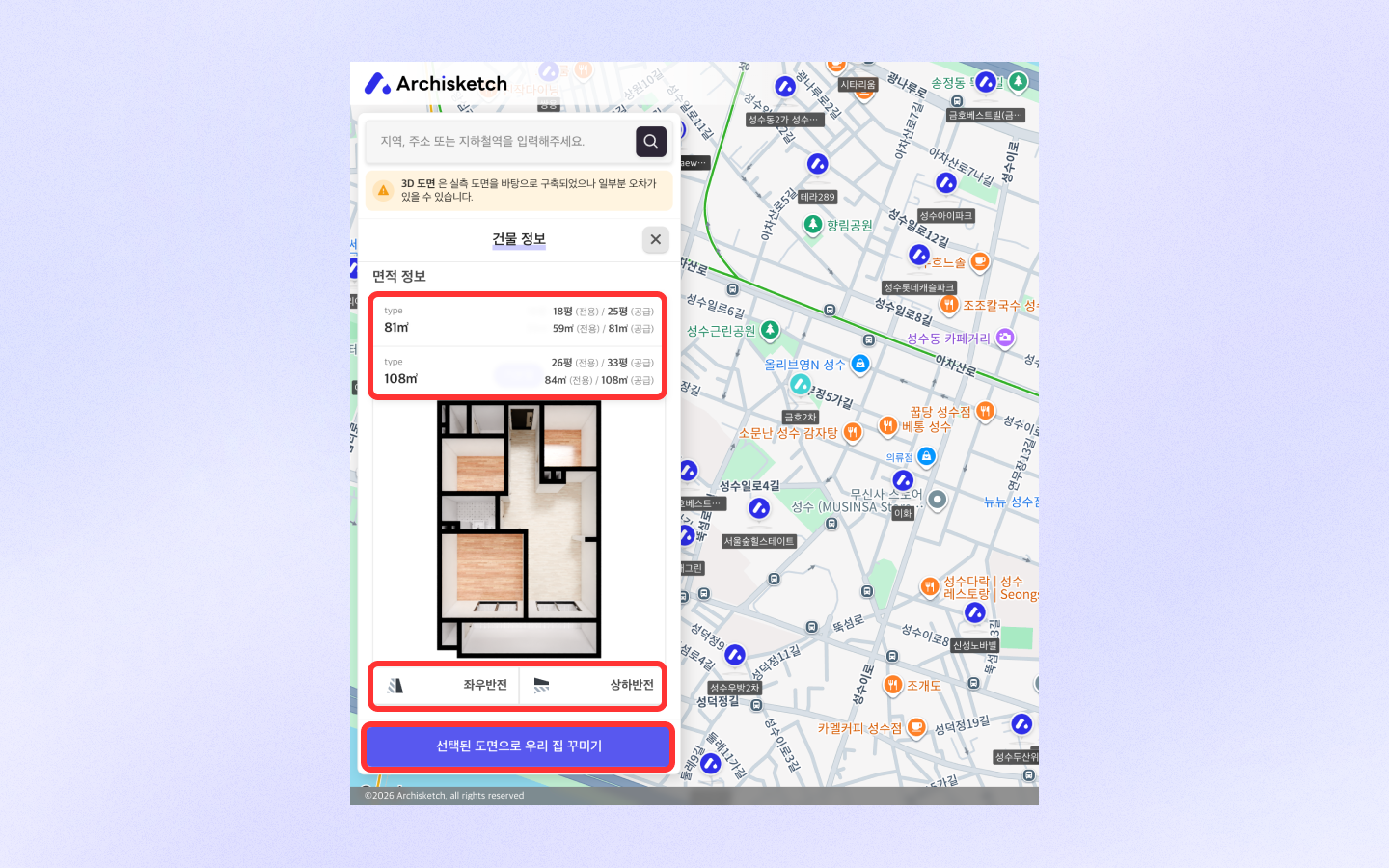
ここで検索欄にマンション名、道路名住所、または駅名などを入力して、必要な情報を探してください。\
地図上のマーカーをクリックしてマンションを選ぶ方法もあります。

希望のマンションが見つかったら、建物情報と面積情報を確認できます。\
また、トグルをクリックして別のタイプの図面も確認できます。
図面の向きを設定したい場合は、左右反転/上下反転機能で希望の向きに調整した後、[選択した図面でわが家をデザインする]をクリックしてください。
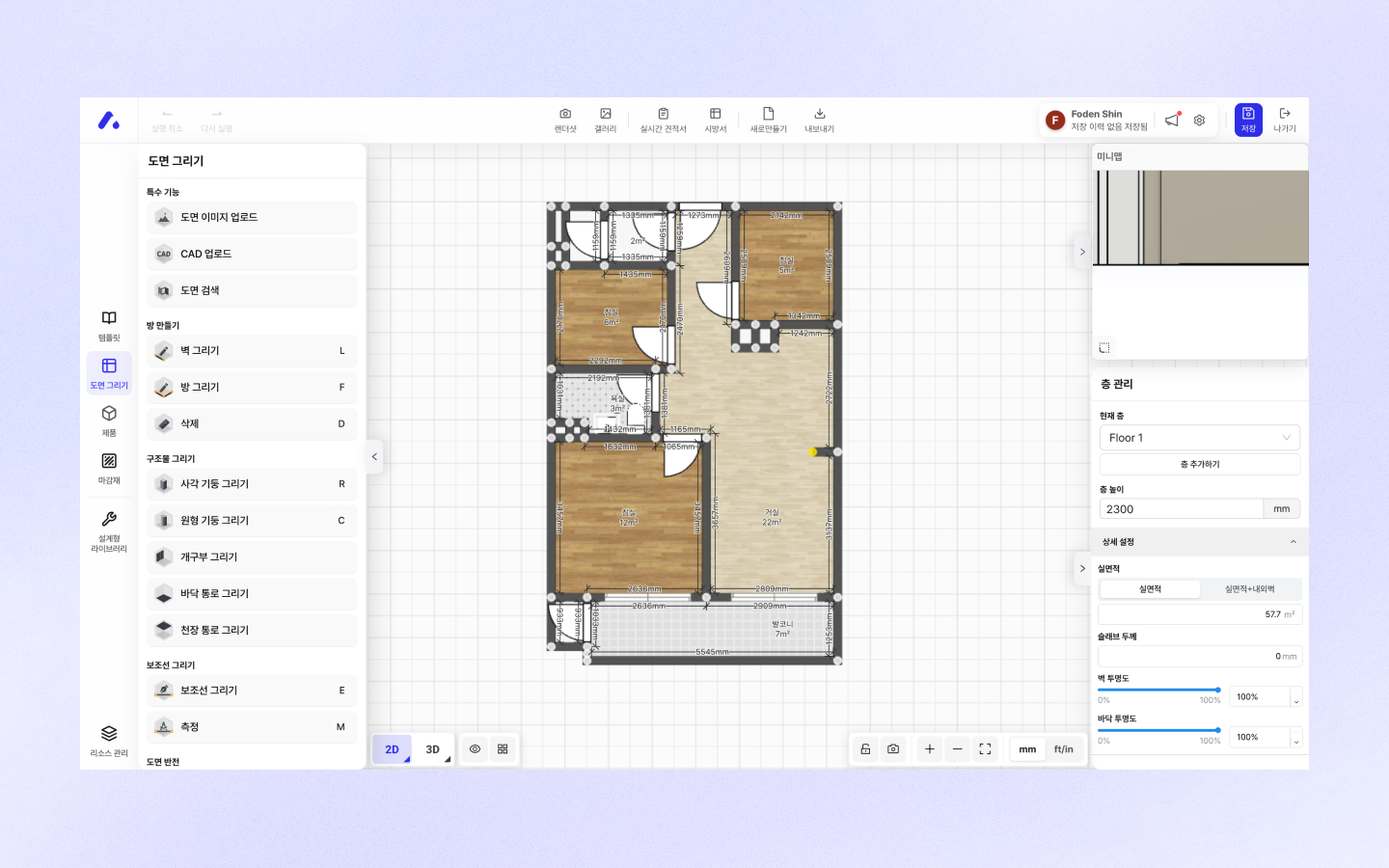
すると、このように図面がエディターに読み込まれます。\
エディターはアーキスケッチ独自の家具配置および図面作成ツールです。\
この空間で図面を描き、家具や仕上げ材を配置し、レンダリングを作成できます。
## よくある質問
#### 自宅の図面がまだ登録されていないのですが、図面作成を依頼できますか?
アーキスケッチを通じて図面作成を依頼できます。(ただし、寸法を含む図面画像がある場合のみ可能)\
フォームに沿って記入して提出すると、正式に図面作成の依頼が受け付けられます。\
詳細は下記をご確認ください。
* 受け付けられた図面の件数と順番に応じて、不定期で更新されます。(平均5〜10日かかります)
* お一人につき1件の図面を無料で作成しています。
***
---
# Agent Instructions
This documentation is published with GitBook. GitBook is the documentation platform designed so that both humans and AI agents can read, navigate, and reason over technical content effectively. Learn more at gitbook.com.
## Querying This Documentation
If you need additional information that is not directly available in this page, you can query the documentation by asking a question.
Perform an HTTP GET request on the following URL with the `ask` and `goal` query parameters:
```
GET https://docs.archisketch.com/guide/user-jp/make-project/search-home.md?ask=&goal=
```
`ask` is the immediate question: it should be specific, self-contained, and written in natural language.
`goal` is what the user is ultimately trying to achieve, the reason they need the answer. Sharing it helps GitBook give you a better, more relevant answer. A goal is most helpful when it describes the outcome the user wants rather than restating the question. For example, with `ask=how do I create an API token`, a goal like `automate deployments from our CI pipeline` lets GitBook tailor the answer to that use case.
The response will contain a direct answer to the question and relevant excerpts and sources from the documentation.
Use this mechanism when the answer is not explicitly present in the current page, you need clarification or additional context, or you want to retrieve related documentation sections.