> For the complete documentation index, see [llms.txt](https://docs.archisketch.com/llms.txt). Markdown versions of documentation pages are available by appending `.md` to page URLs; this page is available as [Markdown](https://docs.archisketch.com/guide/user-en/pro-team-plan/team-plan-refund.md).
# Team plan usage policy
At a glance, we guide you through subscribing to, canceling, account management, and refunds for the Professional Team Plan.
### Start subscription
* A Team Plan subscription includes **credit/debit cards from domestic card issuers**are required. **Foreign cards are not supported.**
* **The subscription starts immediately once payment is completed**.
#### Check subscription information
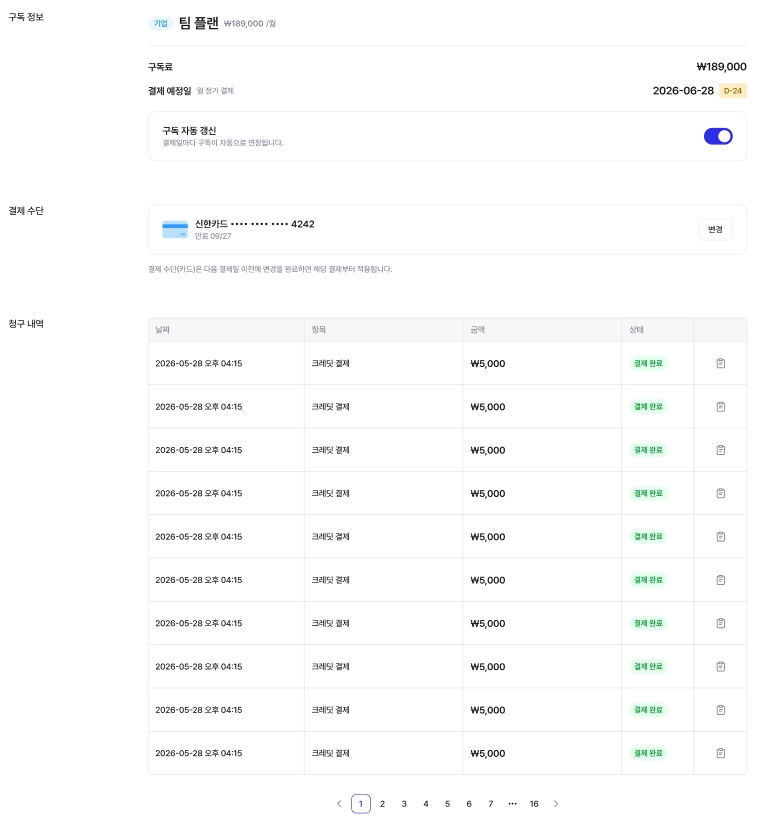
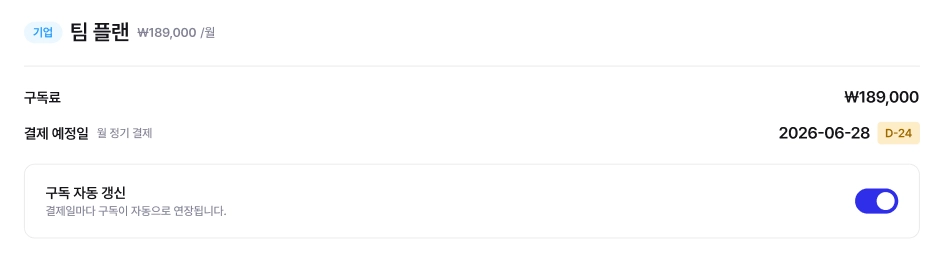
In the administrator (admin) account **Dashboard → My Info → Account Settings → Billing Information**you can check it there.
#### Cancel subscription (turn off auto-renewal)
* **Monthly subscription**: from the dashboard **turn off auto-renewal**is available. If you turn off auto-renewal, **you can use it until the end of that month and then it will end**.
* **Annual subscription**: turning off auto-renewal is not available. To cancel your subscription, **please contact Archisketch Customer Support (ChannelTalk)**.
{% hint style="warning" %}
**Notes after subscription expiration**: after the expiration date, the existing Team Plan domain **will be deactivated and cannot be restored**. Since an expired subscription cannot be reversed, please decide carefully.
{% endhint %}
#### Change payment method (annual ↔ monthly)
You cannot change the payment method within the subscription period (1 year). To change it, **cancel and refund the existing subscription, then subscribe again with the desired method**.
#### Payment failure & grace period
* If payment fails due to a card issue (limit exceeded, expired card, etc.), **a 7-day grace period**is granted. During this period, **automatic retries are made every day at 10:00 AM**, and if payment goes through, the service remains active normally.
* If payment is not completed by the end of the grace period (**the 8th day**), the domain will be deactivated.
* In the admin account \[Subscription Info], check the card registration status and update the billing information within the grace period to continue using the service without interruption.
#### If the service becomes deactivated due to payment failure
If automatic payment fails for 7 days, the service will be suspended and the domain deactivated starting on the 8th day. To resume, **manual payment**is required.
* Request to restore: email or ChannelTalk
* The support team will help you process the payment and restore the domain.
{% hint style="danger" %}
Issues with payment methods, etc. **reasons on the customer side**If payment fails for any reason, the service period will not be extended even if the service is interrupted, and no compensation or refund will be provided for that period.
{% endhint %}
#### Add or remove accounts (change number of people)
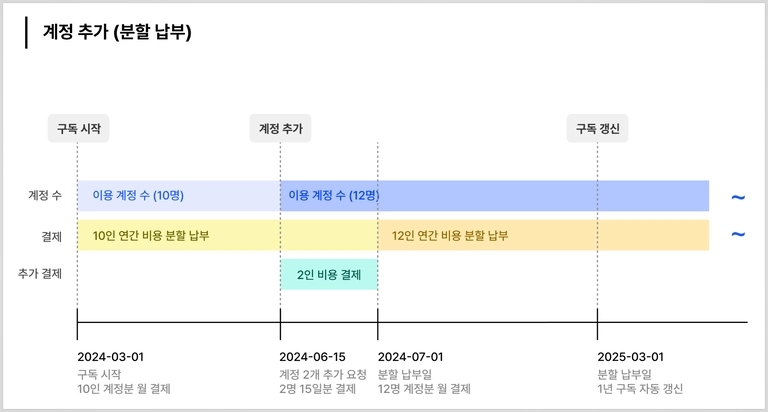
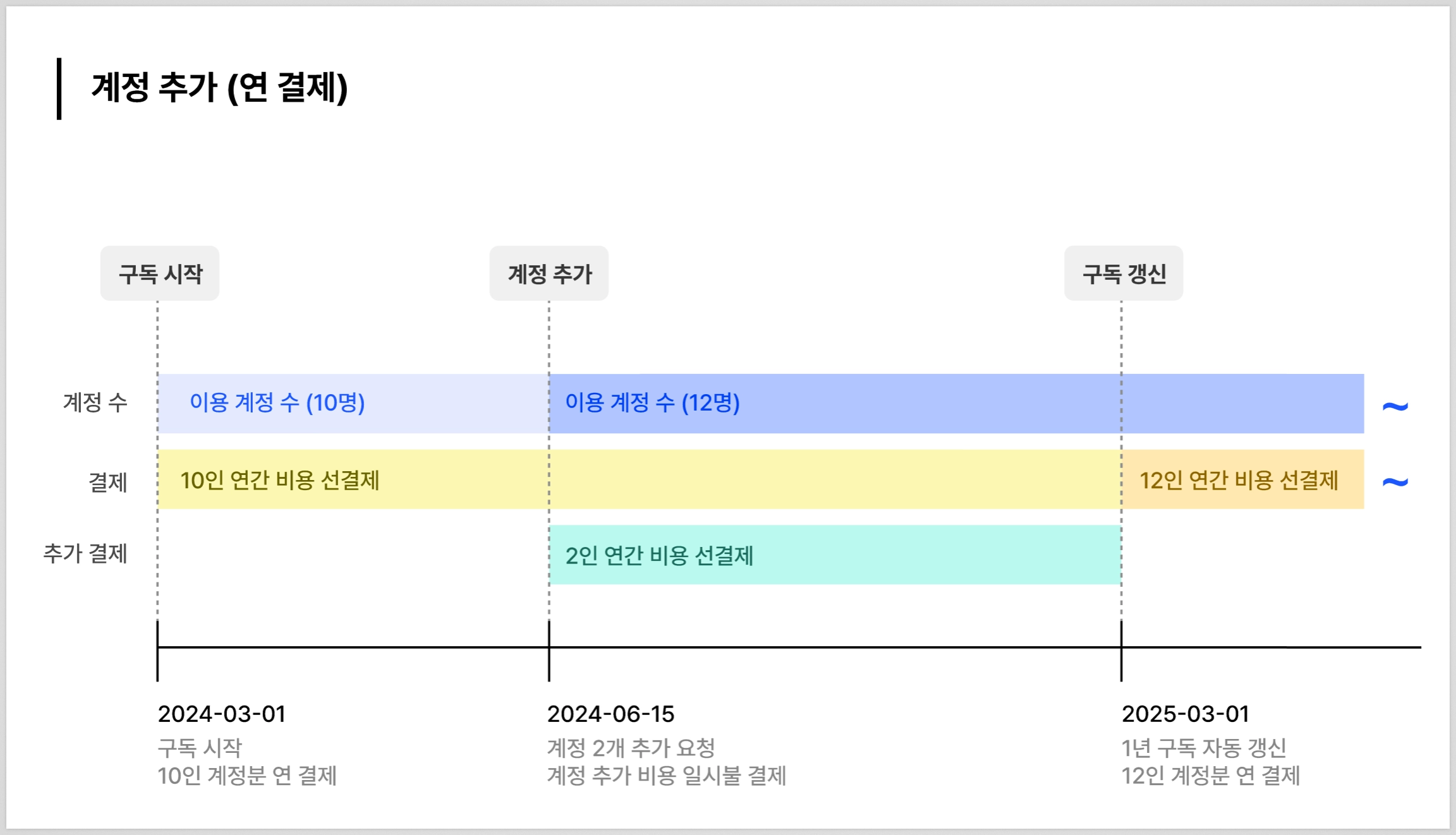
After the initial subscription, you can add or delete accounts (team members). Please request an account limit change through \*\*Customer Support (ChannelTalk)\*\*.
* **Add account**: additional payment → account limit increase → new member can join and use
* **Remove account**: proactively delete the account in Dashboard \[Account Management] → request Customer Support to lower the limit → confirm the account limit has been reduced
* For both additional charges and refunds **only the card used for the initial payment** will be used, and only one card can be registered.
\
📌 **Payment amount when adding accounts**
{% tabs %}
{% tab title="Monthly installment payment customers" %}
Additional account charges are prorated based on the remaining contract period.
* Additional charge (daily) = (monthly fee ÷ number of days in the month) × (remaining days in the month including this month) × (number of additional accounts)
{% endtab %}
{% tab title="Annual payment customers" %}
* If canceled mid-term, the refund amount is calculated based on the remaining subscription period.
* The discount rate of the annual plan will be withdrawn, and recalculated based on the original price.
* Additional accounts are billed in a lump sum after calculating the daily rate for the month of the request.
* (A) Daily rate for the month of request = (monthly fee ÷ number of days in the month) × (remaining days in the month including this month) × (number of additional accounts)
* (B) Charges after the month of request = (monthly fee) × (remaining number of months) × (number of additional accounts)
👉 **(A) + (B) = billed amount**
{% endtab %}
{% endtabs %}
**🚫 Refund when deleting an account**
Deleting an account **is only available on the monthly payment date/renewal date** . The fee for the deleted account **is prorated based on the remaining contract period**and refunded to the original (registered) payment method.
{% tabs %}
{% tab title="Monthly installment payment customers" %}
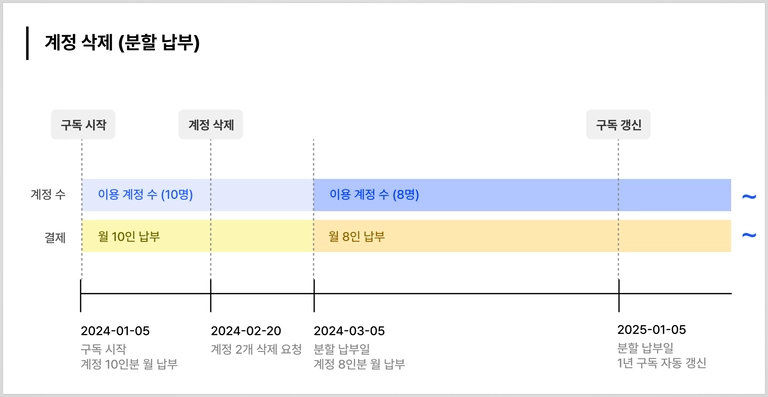
Since account deletion is only possible on the monthly payment date/renewal date, installment payments **do not have a refund amount.**
💡 **Example**
* \[January 5, 2024] Installment payment
* \[February 20, 2024] Request to delete account → Account can be used until \[March 4, 2024]
* \[March 5, 2024] Account deletion applied and installment payment billed
{% endtab %}
{% tab title="Annual payment customers" %}
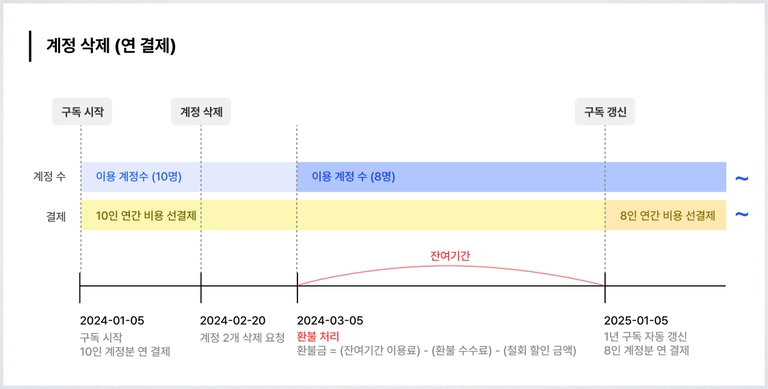
In the month you request account deletion, you continue using the existing account, and from the following month until the subscription renewal date, the refund amount is calculated monthly and paid out.
**How to calculate refunds for annual payment when deleting accounts**
**(A) Charges after the month of request** = (monthly fee) × (remaining number of months) × (number of deleted accounts)
**(B) Fee** = (charges after the month of request) × 10%
**(C) Withdrawal discount amount** = (remaining number of months ÷ 12 months) × (monthly fee) × (discount rate 20%) × (number of deleted accounts)
👉 **(A) − (B) − (C) = final refund amount**
\
💡 **Example**
* \[January 5, 2024] Lump-sum payment
* \[February 20, 2024] Request to delete account → Account can be used until \[March 4, 2024]
* \[March 5, 2024] Refund for usage of deleted accounts from \[March 5, 2024 \~ January 4, 2025]
* \[January 5, 2025] Account deletion applied and lump-sum payment billed
{% endtab %}
{% endtabs %}
#### Refund on subscription cancellation
Team Plan refunds **depend on the payment method (annual / monthly installment)**and **the time of cancellation**.
**Can I get a refund if I cancel my subscription?**
Refund eligibility depends on the time of cancellation. If you cancel within **7 days**after the initial payment, **a full refund**.
**What if I cancel after 7 days?**
Some amount may be refunded or a refund fee may be charged.
> **Refund fee**: **10%** an amount proportional to the remaining days
{% tabs %}
{% tab title="(based on the pre-discount amount)" %}
Cancellation of monthly installment payment
📌 **How to calculate the refund for monthly installment payments**
**(D) Subscription fee for remaining period** = (subscription days remaining until the next payment) × (daily subscription fee)
* Daily subscription fee = (installment payment amount ÷ total number of days in the month) × (number of accounts)
**(E) Refund fee** = (D) × 10%
👉 **(D) − (E) = final refund amount**
{% endtab %}
{% tab title="Cancellation of prepaid annual payment" %}
The refund amount is calculated based on the remaining subscription period. **(A) Balance for the remaining period from the one-time payment amount**minus **(B) withdrawal discount amount**and **(C) refund fee**is refunded after deduction, and if you cancel your subscription, the service ends immediately.
📌 **How to calculate refunds for prepaid annual payments**
**(A) Subscription fee for remaining period** = (total daily subscription fee) + (total monthly subscription fee)
* Total daily subscription fee = (lump-sum payment amount ÷ 365 days) × (remaining days in the month of application) × (number of accounts)
* Total monthly subscription fee = (remaining number of months from the following month until subscription renewal date) × (lump-sum payment amount ÷ 12 months) × (number of accounts)
**(B) withdrawal discount amount** = (remaining number of months ÷ 12 months) × (monthly fee) × (discount rate 20%) × (number of accounts)
**(C) refund fee** = (A) × 10%
👉 **(A) − (B) − (C) = final refund amount**
{% endtab %}
{% endtabs %}
**Can I get a refund if I haven't used the number of accounts I paid for?**
Members can join within the number of accounts set at the time of the initial payment, **and refunds are not possible regardless of the number of members who joined**. (For example, if you paid for a 5-person plan but only 3 people actually used it, refunds are not possible.)
#### Refund procedure
* A refund request is received through Customer Support (ChannelTalk).
* **Only the card used for the payment** can be refunded.
* Refund processing **takes about 5\~7 business days** .
---
# Agent Instructions
This documentation is published with GitBook. GitBook is the documentation platform designed so that both humans and AI agents can read, navigate, and reason over technical content effectively. Learn more at gitbook.com.
## Querying This Documentation
If you need additional information that is not directly available in this page, you can query the documentation by asking a question.
Perform an HTTP GET request on the following URL with the `ask` and `goal` query parameters:
```
GET https://docs.archisketch.com/guide/user-en/pro-team-plan/team-plan-refund.md?ask=&goal=
```
`ask` is the immediate question: it should be specific, self-contained, and written in natural language.
`goal` is what the user is ultimately trying to achieve, the reason they need the answer. Sharing it helps GitBook give you a better, more relevant answer. A goal is most helpful when it describes the outcome the user wants rather than restating the question. For example, with `ask=how do I create an API token`, a goal like `automate deployments from our CI pipeline` lets GitBook tailor the answer to that use case.
The response will contain a direct answer to the question and relevant excerpts and sources from the documentation.
Use this mechanism when the answer is not explicitly present in the current page, you need clarification or additional context, or you want to retrieve related documentation sections.