> For the complete documentation index, see [llms.txt](https://docs.archisketch.com/llms.txt). Markdown versions of documentation pages are available by appending `.md` to page URLs; this page is available as [Markdown](https://docs.archisketch.com/guide/intro-jp/update-note/2026/202604/20260423.md).

# \[2026.04.23] エディター機能の改編

#### 1. エディター

**1.1. エディター > 層（レイヤー）管理機能の改編および詳細設定機能の追加**

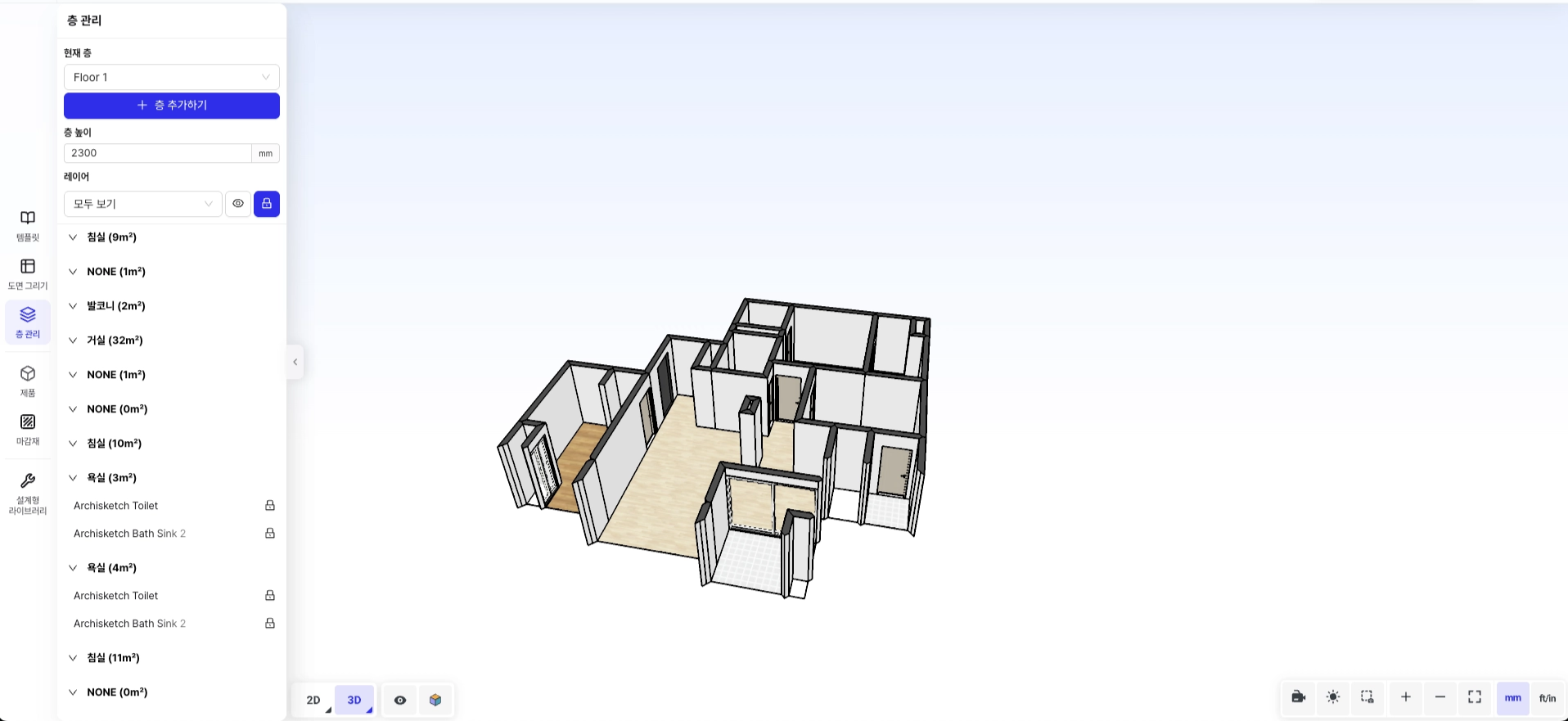
既存 **層管理ページ**A **1) リソース管理**と **2) 層（レイヤー）管理** 2つのページに分かれます。

**変更前**

**層管理ページ**

層の高さ設定と層の追加・作成が可能で、各層に含まれる空間およびアイテムをひと目で確認できる構成です。

<figure><img src="/files/b8b3bf7bebfa2ace48e8b227ef7c40e2b61f82b8" alt=""><figcaption><p>変更前の層管理ページ</p></figcaption></figure>

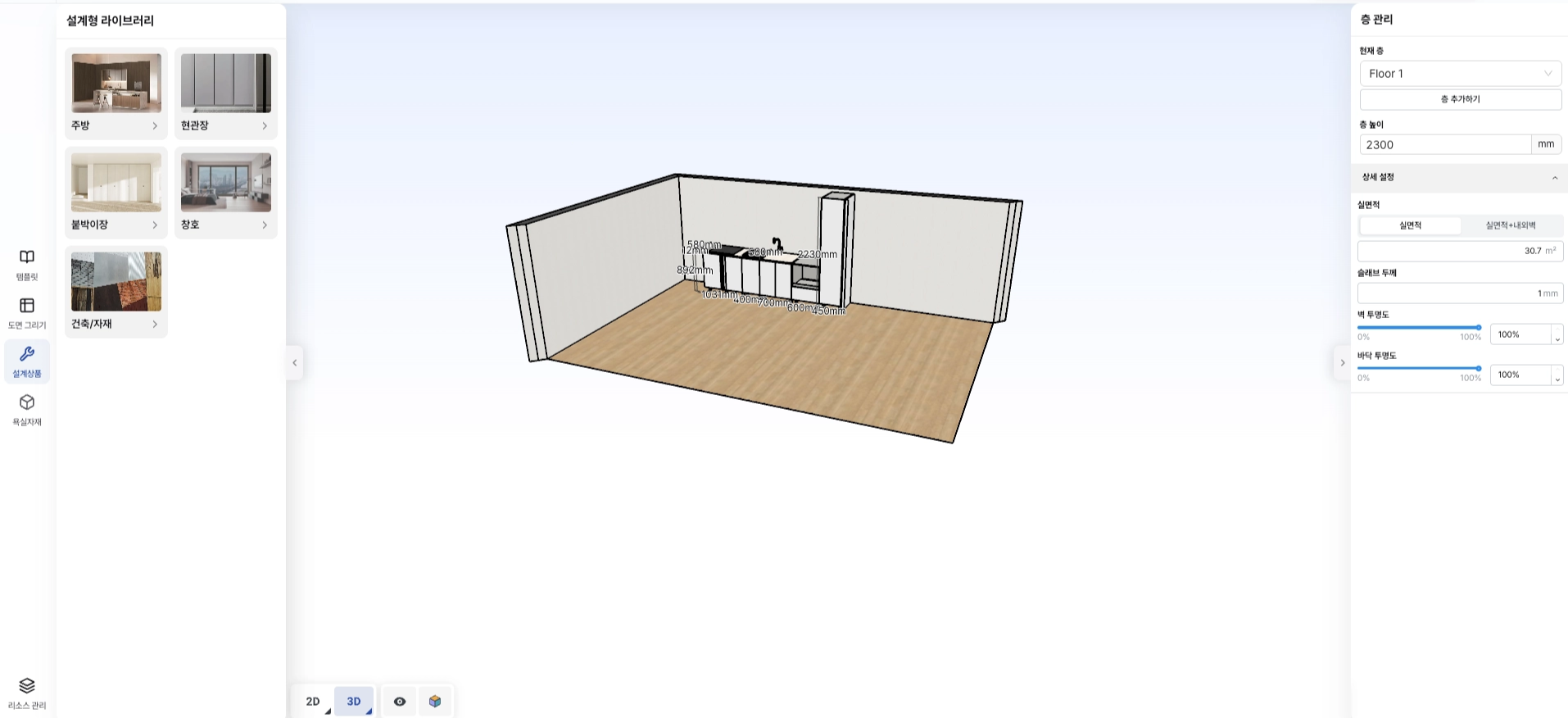
**変更後**

**1. 層管理ページ**

層の高さ設定および層の追加・作成はもちろん、実面積、スラブ厚、壁/床の透明度などの詳細設定まで調整できます。層管理UIは右側パネルに常時表示されます。

<figure><img src="/files/0707d34cfce0a45808cc1bff76dc390e9024d273" alt=""><figcaption><p>変更後の層管理ページ</p></figcaption></figure>

**2. リソース管理ページ**

各層に含まれる空間およびアイテムを全体的に確認できる別途の管理ページです。

![リソース管理ページ](/files/d24b8ba2896b7a3a3e9c32360a2f3bdb07ca3bf0)

**1.2. 層管理 > \[実面積] ↔ \[実面積 + 内外壁] 表示および修正機能の追加**

右側の層管理パネルで **実面積** または **実面積 + 内外壁を含む面積** 情報を確認し、層全体のサイズを直接調整できます。

![実面積の表示および修正](/files/6a9c2b54a22ac13be105bb467ae878393e77d876)

層全体のサイズを変更すると、以下の案内メッセージが表示されます。

* 仕上げ材エディターで修正した壁、床、天井の仕上げ材は既定値に初期化されます。
* 天井エディターで生成した天井構造物は削除されます。

![サイズ変更の案内メッセージ](/files/079e8cd0c262a0dc05d865a90c767a903b552b8a)

**1.3. 層管理 > スラブ厚設定機能の追加**

右側の層管理パネルで、スラブ厚の入力値を通じて層全体のスラブ厚を設定できます。

|                        スラブ厚 1                        |                       スラブ厚 1000                      |
| :--------------------------------------------------: | :--------------------------------------------------: |
| ![](/files/7b601d11a6bea57c55245451408b4d499f6fbaaa) | ![](/files/c3c7d66ee6e32c2267b2e846e5f8f81295ab0d5f) |

**1.4. 層管理 > 壁/床の透明度設定機能の追加**

右側の層管理パネルで、全体の壁と床の透明度を個別に設定できます。

**壁の透明度**

|                      2D: 壁の透明度 0                     |                      3D: 壁の透明度 0                     |
| :--------------------------------------------------: | :--------------------------------------------------: |
| ![](/files/3e467fb6ad4bbaf22e5f2d860126f5c6304731e2) | ![](/files/e7808d1a69f7d119dafa667e5823f5cdf1998a11) |

**床の透明度**

|                      2D: 床の透明度 0                     |                      3D: 床の透明度 0                     |
| :--------------------------------------------------: | :--------------------------------------------------: |
| ![](/files/a7a32e0bd7478b898cbf494217de7eca7f27ddfc) | ![](/files/7a120bc1637f7f76b60ef7b4b8a159119f063b42) |

**1.5. Render Studioの壁表示オプションの追加**

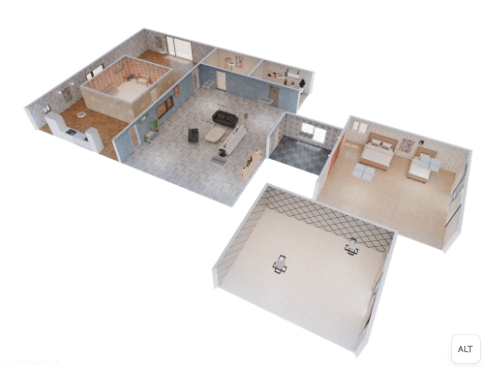
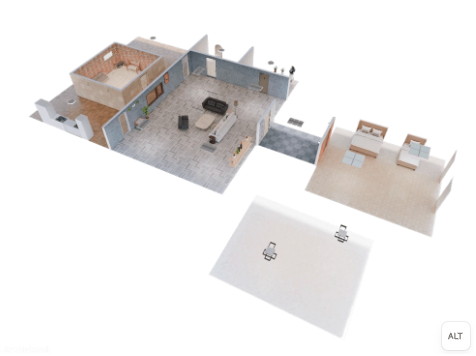
エディターおよびRender Studioに内壁/外壁を隠すオプションが追加されました。Render Studioでは壁の透明化設定がレンダリング結果にそのまま反映されるため、壁の透明化(Culling)、内壁を隠す、外壁を隠すレンダリングが可能です。

**レンダリング結果**

**壁透明化レンダリング**

<figure><img src="/files/99135a9f67f63b1d4f2a4ee8bb42c29aae16af1f" alt=""><figcaption><p>壁透明化レンダリング</p></figcaption></figure>

**外壁非表示レンダリング**

<figure><img src="/files/7edf2f7384f475d381a5bfe5757f0878ed722ec6" alt=""><figcaption><p>外壁非表示レンダリング</p></figcaption></figure>

**内壁非表示レンダリング（+壁透明化）**

<figure><img src="/files/e8f627e3dfd15e12810ea83278760e657c4417eb" alt=""><figcaption><p>内壁非表示レンダリング（+壁透明化）</p></figcaption></figure>

**内壁・外壁の両方を非表示**

<figure><img src="/files/ea1d7a088efdae377718eca5b87eebf77f60a38d" alt=""><figcaption><p>内壁・外壁を非表示</p></figcaption></figure>

**1.6. 仕様書エディター > 天井図コンテンツの追加**

仕様書エディターに天井図コンテンツが追加されます。設計した図面の全体天井図を自動生成し、天井アイテムの配置状態を確認できます。

<figure><img src="/files/ab54ae3fe8ad7bf0d7d9ae52a2e527d3fab041eb" alt=""><figcaption><p>仕様書エディター天井図</p></figcaption></figure>

***

#### 2. モジュラー | パラメトリックエディター

**2.1. パラメトリックエディター内のコンポーネントコピー・貼り付け機能の追加**

パラメトリックエディターでモデリング、パラメトリック部品アイテム、全体アイテムをコピー・貼り付けできます。異なるブラウザ間でも（例: Chrome ↔ Edge）正常に動作します。

***

#### Coming Soon

次の機能を準備中です。

* **カスタム家具ライブラリ > コンテンツ詳細の一括編集** — 商品/部品ライブラリでアイテムを複数選択し、下位属性を一度に編集できます。
* **カスタム家具ライブラリ > 変数詳細の一括編集** — 商品/部品ライブラリでアイテムを複数選択し、下位変数属性を一度に編集できます。


---

# Agent Instructions
This documentation is published with GitBook. GitBook is the documentation platform designed so that both humans and AI agents can read, navigate, and reason over technical content effectively. Learn more at gitbook.com.

## Querying This Documentation
If you need additional information that is not directly available in this page, you can query the documentation dynamically by asking a question.

Perform an HTTP GET request on the current page URL with the `ask` query parameter, and the optional `goal` query parameter:

```
GET https://docs.archisketch.com/guide/intro-jp/update-note/2026/202604/20260423.md?ask=<question>&goal=<endgoal>
```

`ask` is the immediate question: it should be specific, self-contained, and written in natural language.
`goal` is optional and describes the broader end goal you are ultimately trying to accomplish on behalf of the user. GitBook uses it to tailor the answer towards what is most useful for that goal.

The response will contain a direct answer to the question and relevant excerpts and sources from the documentation.

Use this mechanism when the answer is not explicitly present in the current page, you need clarification or additional context, or you want to retrieve related documentation sections.