> For the complete documentation index, see [llms.txt](https://docs.archisketch.com/llms.txt). Markdown versions of documentation pages are available by appending `.md` to page URLs; this page is available as [Markdown](https://docs.archisketch.com/guide/intro-en/update-note/2026/202607/20260716.md).
# \[2026.07.16] Added curved wall feature and account management·part classification
#### 1.1. (Improvement) Added detailed information fields by category and user in Account Management
The Account Management page has been improved so that detailed information by category and user can be entered and managed.
* When creating or editing a category **Email, contact number, address, postal code, store code** Can be entered
* When creating or editing a user account **Contact number, address, postal code, store code** Can be registered
* Address search is provided according to the language used (Korean: Daum postal code search / Overseas: Google address search)
Before


After


#### 1.2. (End) 3D drawing request service terminated
The 3D drawing request service has been terminated. The 3D drawing request menu in the side menu and related pages have been removed, and the feature is no longer available.
Before

After

### 2. Editor
#### 2.1. (New) Added curved wall feature in the drawing editor
A feature that lets you change a straight wall into a smooth curved shape **curved wall feature**has been added.
* By adjusting the degree of curvature, you can design various shapes such as stadium-shaped spaces and spaces with rounded ends.
* Currently, for stable space and floor generation, **only outwardly convex shapes are supported** (not applicable to walls curved inward, shared partition walls, etc.)
* Access path: Draw Drawing > Draw Curved Wall / Click Wall > \[Wall Details] > Convert to Curved Wall / Wall right-click menu

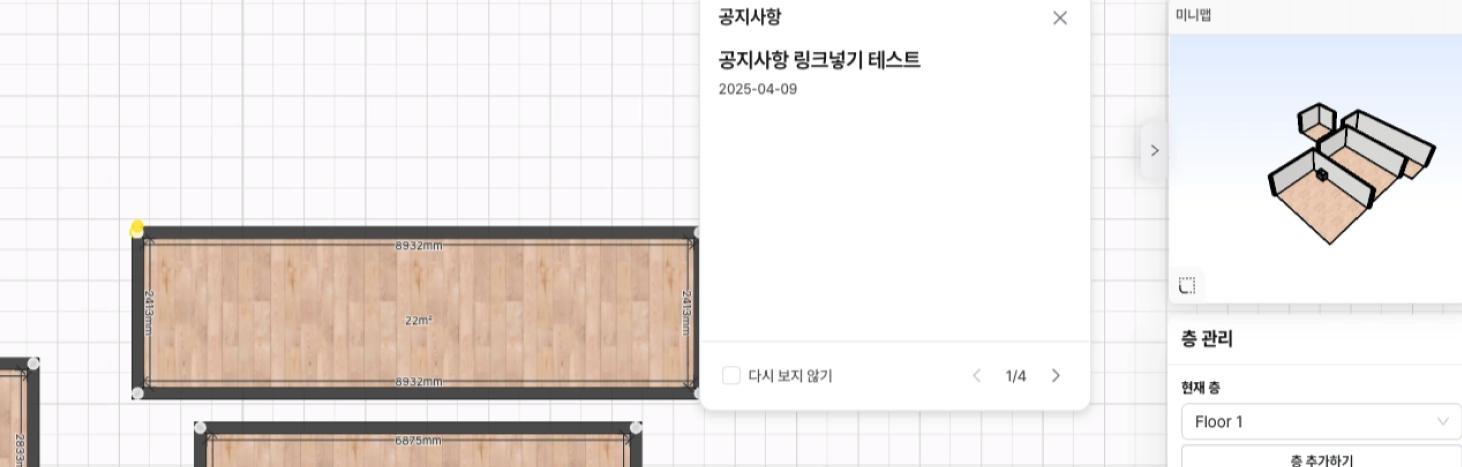
#### 2.2. (Improvement) Improved announcement UI in the drawing editor
The announcement UI has been improved so that major updates and notices can be checked more conveniently. The screen layout has been organized so that titles and content can be seen at a glance, and new announcements can be easily distinguished from existing ones.
Before

After
#### 2.3. (Improvement) Added seller information display in real-time quotations
The logged-in user's seller information is displayed at the top of the real-time quotation.
* Displayed items: **Person in charge, phone number, email, store name, address** (based on the information registered in Account 'My Information')
* **Also reflected in PDF and Excel download documents**
Before

After

#### 2.4. (New) Added card and list view modes in the product library
In the product library **Card view / List view** modes have been added. You can choose card view for image-centered browsing or list view for information comparison, and the same view options are available in the parametric sale panel.


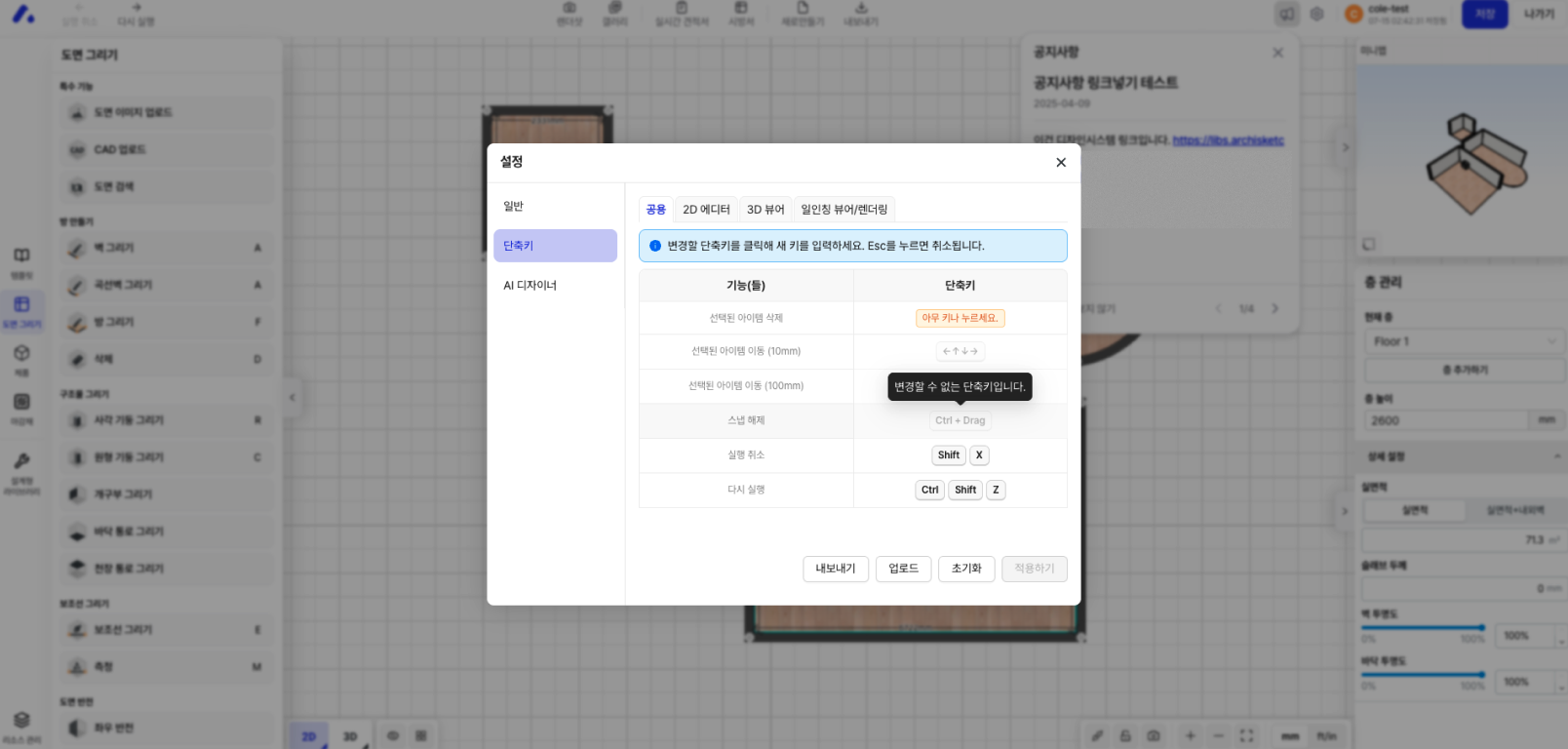
#### 2.5. (New) Added shortcut settings feature in the drawing editor
A shortcut settings feature that lets you change shortcuts to the keys you want **shortcut settings feature**has been added.
* Previously separate shortcut menus have been unified into one, **common, 2D editor, 3D viewer, render** can be checked and configured by category
* The changed key **will be finally applied only when you click the 'Apply' button** (the shortcut guide in the left menu is also updated as soon as it is applied)
* If you enter a key that is already in use, duplicate status is indicated
* The configured shortcuts can **be exported to and imported from a JSON file**
* Access path: Settings > Shortcuts
Before

After
You can change shortcuts by clicking the shortcut button. Sections where shortcut button changes are not possible are shown with the shortcut button disabled.
### 3. Modular
#### 3.1. (Improvement) Improved component classification system in the parametric editor
Component classification **major category, middle category, minor category** system has been reorganized.
* The same classification system is used on the part save/overwrite screen and the new part creation screen
* The existing part type and detailed classification input fields have been streamlined
* The behavior and settings of existing parts remain unchanged
Before

After

---
# Agent Instructions
This documentation is published with GitBook. GitBook is the documentation platform designed so that both humans and AI agents can read, navigate, and reason over technical content effectively. Learn more at gitbook.com.
## Querying This Documentation
If you need additional information that is not directly available in this page, you can query the documentation dynamically by asking a question.
Perform an HTTP GET request on the current page URL with the `ask` query parameter, and the optional `goal` query parameter:
```
GET https://docs.archisketch.com/guide/intro-en/update-note/2026/202607/20260716.md?ask=&goal=
```
`ask` is the immediate question: it should be specific, self-contained, and written in natural language.
`goal` is optional and describes the broader end goal you are ultimately trying to accomplish on behalf of the user. GitBook uses it to tailor the answer towards what is most useful for that goal.
The response will contain a direct answer to the question and relevant excerpts and sources from the documentation.
Use this mechanism when the answer is not explicitly present in the current page, you need clarification or additional context, or you want to retrieve related documentation sections.