> For the complete documentation index, see [llms.txt](https://docs.archisketch.com/llms.txt). Markdown versions of documentation pages are available by appending `.md` to page URLs; this page is available as [Markdown](https://docs.archisketch.com/guide/faq-jp/service/personal-plan.md).
# 個人プラン(有料サブスクリプション)
個人プランの選択と支払い、企業プランとの違いに関する質問を集めました。
#### どのプランを選べばいいですか?
プロジェクトの制作量と必要な機能に応じてプランを選んでください。
* デザインをあまり多く制作しないなら → **無料のベーシックプラン**でもさまざまな基本機能を利用できます。
* 高度な機能が必要なら → 有料の **スタンダード**・**プラス** プランをおすすめします。特に以下のケースに適しています。
* 家具の素材をエディタで直接修正したい場合
* 自分所有のモデリングファイルをアップロードしたい場合
* 仕上げ材を直接アップロードしたい場合(プラス)
* CADファイルで図面をアップロードしたい場合(プラス)
* 毎月使うレンダリング数が多い場合
| 区分 | ベーシック | スタンダード | プラス |
| --------------- | ----- | ------ | ----- |
| 家具の素材修正 | ❌ | ✔ | ✔ |
| モデリングファイルアップロード | ❌ | ✔ | ✔ |
| 仕上げ材を直接アップロード | ❌ | ❌ | ✔ |
| CAD図面アップロード | ❌ | ❌ | ✔ |
| 月間レンダリング提供数 | 基本 | 十分 | 非常に十分 |
詳しいプラン比較は [プランと機能のご案内](https://www.archisketch.com/ko/pricing/)でご確認ください。
#### 料金はいつ支払われますか?
* ベーシックプランは料金がかかりません。
* スタンダード・プラスは初回決済後、登録された決済手段で **支払日に自動決済**されます。
* 購読を希望しない場合は、次の支払日までに **自動更新を解除**してください。(方法は下記をご参照ください)
#### 個人プランと企業(チーム)プランの違い
* **個人プラン**: Archisketchが標準提供する無料のモデリング・仕上げ材を利用できます。個人ユーザーに適しており、基本機能を便利に使えます。
* **企業(チーム)プラン**: 基本機能に加えて、企業向けのカスタマイズサービスとブランド別の特化サポートを提供します。別途サポートが必要な場合は、導入のお問い合わせでご案内します。
#### 購読解除の方法
個人プランの利用をやめたい場合は、2つの方法があります。損なくやめるには **自動更新解除**をおすすめします。
#### 1) 自動更新解除(推奨)
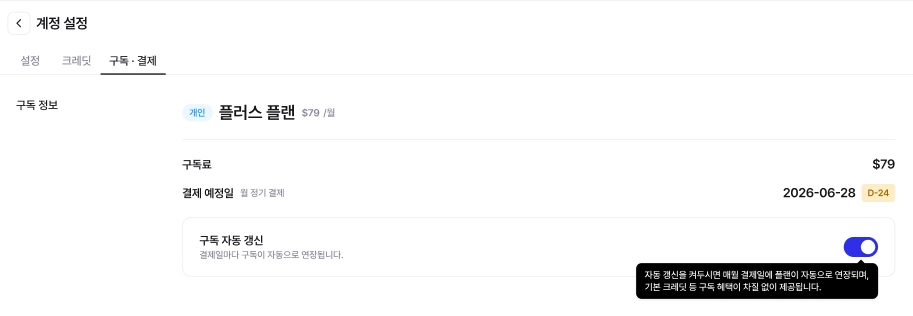
次の支払日までに自動更新を解除すると **次回の支払いから請求されません。** すでに支払った期間はそのまま最後までご利用いただけます。
**移動手順**
アカウント設定 → 購読情報 → 購読情報の右側 **「自動更新設定解除」** を選択
#### 2) 購読を即時キャンセル
今すぐ **ベーシック(無料)プラン**に切り替わります。
{% hint style="danger" %}
**注意**: 「購読を即時キャンセル」ボタンを押すと、ベーシック(無料)プランに即時変更され、 **残り日数分の返金はできません**。支払日まで使ってから解除する場合は、上記の「自動更新解除」をご利用ください。
{% endhint %}
#### 返金のご案内
* スタンダード・プラスは決済後 **7日以内**なら **全額返金**されます。
* 7日を過ぎた場合は、自動更新を解除してもその月まで利用され、 **翌月から自動的に購読が解除**されます。
* 自動決済を事前に止めたい場合は、「自動更新解除」をご利用ください。
* ベーシック(無料)プランは支払いがないため、返金対象ではありません。
---
# Agent Instructions
This documentation is published with GitBook. GitBook is the documentation platform designed so that both humans and AI agents can read, navigate, and reason over technical content effectively. Learn more at gitbook.com.
## Querying This Documentation
If you need additional information that is not directly available in this page, you can query the documentation by asking a question.
Perform an HTTP GET request on the following URL with the `ask` and `goal` query parameters:
```
GET https://docs.archisketch.com/guide/faq-jp/service/personal-plan.md?ask=&goal=
```
`ask` is the immediate question: it should be specific, self-contained, and written in natural language.
`goal` is what the user is ultimately trying to achieve, the reason they need the answer. Sharing it helps GitBook give you a better, more relevant answer. A goal is most helpful when it describes the outcome the user wants rather than restating the question. For example, with `ask=how do I create an API token`, a goal like `automate deployments from our CI pipeline` lets GitBook tailor the answer to that use case.
The response will contain a direct answer to the question and relevant excerpts and sources from the documentation.
Use this mechanism when the answer is not explicitly present in the current page, you need clarification or additional context, or you want to retrieve related documentation sections.