> For the complete documentation index, see [llms.txt](https://docs.archisketch.com/llms.txt). Markdown versions of documentation pages are available by appending `.md` to page URLs; this page is available as [Markdown](https://docs.archisketch.com/guide/faq-en/service/personal-plan.md).
# Personal plan (paid subscription)
We’ve gathered questions about choosing a personal plan, payment, and the differences from enterprise plans.
#### Which plan should I choose?
You can choose a plan based on your project volume and the features you need.
* If you don’t create many designs → **Free Basic Plan**gives you access to a variety of basic features.
* If you need advanced features → Paid **Standard**·**Plus** plans are recommended. They’re especially suitable in the following cases.
* If you want to edit furniture materials directly in the editor
* If you want to upload your own modeling files
* If you want to upload finishing materials yourself (Plus)
* If you want to upload drawings as CAD files (Plus)
* If you use a large number of renderings each month
| Category | Basic | Standard | Plus |
| ----------------------------------- | ----- | -------- | ------------- |
| Edit furniture materials | ❌ | ✔ | ✔ |
| Upload modeling files | ❌ | ✔ | ✔ |
| Upload finishing materials directly | ❌ | ❌ | ✔ |
| Upload CAD drawings | ❌ | ❌ | ✔ |
| Monthly rendering allowance | Basic | Generous | Very generous |
For a detailed plan comparison, [Plan and feature guide](https://www.archisketch.com/ko/pricing/)please check here.
#### When is the payment charged?
* The Basic plan is free of charge.
* Standard and Plus are **automatically billed on each billing date**to the payment method you registered after the initial payment.
* If you do not want to subscribe, before the next billing date **turn off automatic renewal**please. (See below for how to do it)
#### Difference between individual plans and business (team) plans
* **Individual plan**: You can use the free modeling and finishing materials provided by Archisketch. Suitable for individual users, it lets you conveniently use the basic features.
* **Business (team) plan**: In addition to the basic features, we provide business-tailored services and brand-specific support. If you need separate support, you can get guidance through an inquiry for implementation.
#### How to cancel your subscription
If you want to stop using the individual plan, there are two ways. To cancel without losing money, **turning off automatic renewal**is recommended.
#### 1) Turn off automatic renewal (recommended)
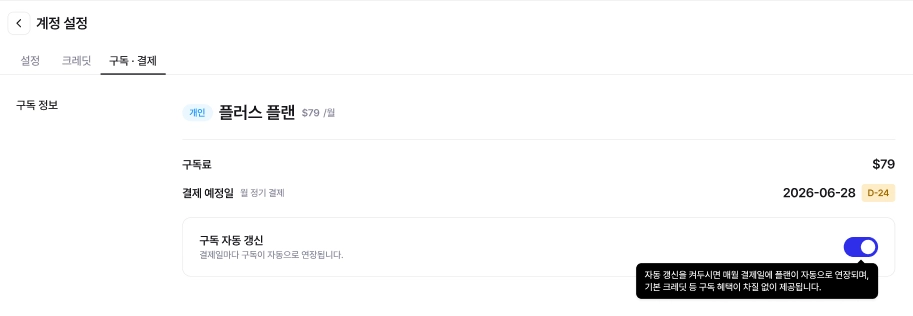
If you turn off automatic renewal before the next billing date, **you will not be charged from the next billing date onward.** You can still use the period you have already paid for until the end.
**Path**
Account Settings → Subscription Info → to the right of Subscription Info **‘Turn off automatic renewal settings’** select
#### 2) Cancel subscription immediately
right away **Basic (free) plan**is switched to.
{% hint style="danger" %}
**Note**: If you click the ‘Cancel subscription immediately’ button, you will be switched to the Basic (free) plan right away, and **refunds for the remaining days are not available**. If you want to use it until the payment date and then cancel, please use the ‘Turn off automatic renewal’ option above.
{% endhint %}
#### Refund information
* Standard and Plus, within **7 days**after payment **full refund**to the payment method you registered after the initial payment.
* If it has been more than 7 days, when you turn off automatic renewal, you can use it until that month ends, and **the subscription will be automatically canceled starting next month**to the payment method you registered after the initial payment.
* If you want to stop automatic payments in advance, please use ‘Turn off automatic renewal’.
* The Basic (free) plan does not involve payment, so it is not eligible for refunds.
---
# Agent Instructions
This documentation is published with GitBook. GitBook is the documentation platform designed so that both humans and AI agents can read, navigate, and reason over technical content effectively. Learn more at gitbook.com.
## Querying This Documentation
If you need additional information that is not directly available in this page, you can query the documentation by asking a question.
Perform an HTTP GET request on the following URL with the `ask` and `goal` query parameters:
```
GET https://docs.archisketch.com/guide/faq-en/service/personal-plan.md?ask=&goal=
```
`ask` is the immediate question: it should be specific, self-contained, and written in natural language.
`goal` is what the user is ultimately trying to achieve, the reason they need the answer. Sharing it helps GitBook give you a better, more relevant answer. A goal is most helpful when it describes the outcome the user wants rather than restating the question. For example, with `ask=how do I create an API token`, a goal like `automate deployments from our CI pipeline` lets GitBook tailor the answer to that use case.
The response will contain a direct answer to the question and relevant excerpts and sources from the documentation.
Use this mechanism when the answer is not explicitly present in the current page, you need clarification or additional context, or you want to retrieve related documentation sections.