> For the complete documentation index, see [llms.txt](https://docs.archisketch.com/llms.txt). Markdown versions of documentation pages are available by appending `.md` to page URLs; this page is available as [Markdown](https://docs.archisketch.com/guide/enterprise-jp/manage-furniture/upload-skp.md).
# SKPファイルアップロード
ArchisketchはSKPファイルのアップロードをサポートしています。ただし、容量が大きい、またはメッシュが多いモデリングファイルはアップロードできないか、エディタでエラーが発生する場合があります。
## 家具アップロード
### 1段階。ファイル選択
\[企業ライブラリ → 製品 → 家具アップロード]をクリックして、ファイルを選択してください。

* **アップロード可能なファイル形式**: SKP, ZIP (OBJ, GLTF)
* **SKPバージョン**: 2023以下
* **容量制限**: 100MB以下
{% hint style="warning" %}
100MB以下のファイルでも、メッシュが多いモデリングファイルの場合はアップロードできないか、エディタでエラーが発生する場合があります。アップロード中にエラーが発生した場合は、チャネルトークを通じてお問い合わせください。
{% endhint %}
### 2段階。属性設定
名前を修正したり、製品配置に関する属性を指定したりできます。
1. **名前の修正**: 製品名を修正できます。
2. **製品の配置**: 製品が配置される位置に応じて属性を指定できます。
* 床に置く製品: ラグ
* 床に置かれる製品: 椅子、テーブル
* 天井に付く製品: シーリングライト、シーリングファン
* 壁に付く製品: カーテン、額縁
3. **追加アップロード**: 他の製品を追加で選択してアップロードできます。(複数選択可能)

### 3段階。アップロード
\[アップロード]ボタンをクリックすると、製品のアップロードが始まります。

1. **戻る**: \[家具ライブラリ - 未分類製品]へ移動し、アップロード進行中の製品を確認できます。
2. **材質変更**: \[Effector]に入って材質を修正したり、サイズを変更したりできます。
3. **追加アップロード**: 続けて追加製品のアップロードが可能です。
{% hint style="warning" %}
**アップロード完了した製品はカテゴリ整理が必須です!**
アップロードされた製品は最初に\[未分類製品]カテゴリに保存され、この状態ではエディタで確認したり使用したりできません。エディタで製品を活用するには、必ず適切なカテゴリへ移動してください。
{% endhint %}
## モデリング軽量化
#### モデリング軽量化ガイド
Archisketch家具ライブラリにモデリングをアップロードする場合、ファイル容量だけでなく、モデルを構成するMeshおよびVertex数によってアップロードが制限されることがあります。
現在のアップロード基準は以下のとおりです。
* ファイル容量: 100MB以下
* Mesh: 500個以下
* Vertex: 1,000,000個以下
したがって、ファイル容量が100MB以下の場合でも、Mesh数が多いかモデル構造が複雑であればアップロードが制限されることがあります。
#### アップロードできない場合
モデリングアップロード時に制限基準を超えてアップロードできない場合は、3Dモデリングの軽量化作業が必要です。
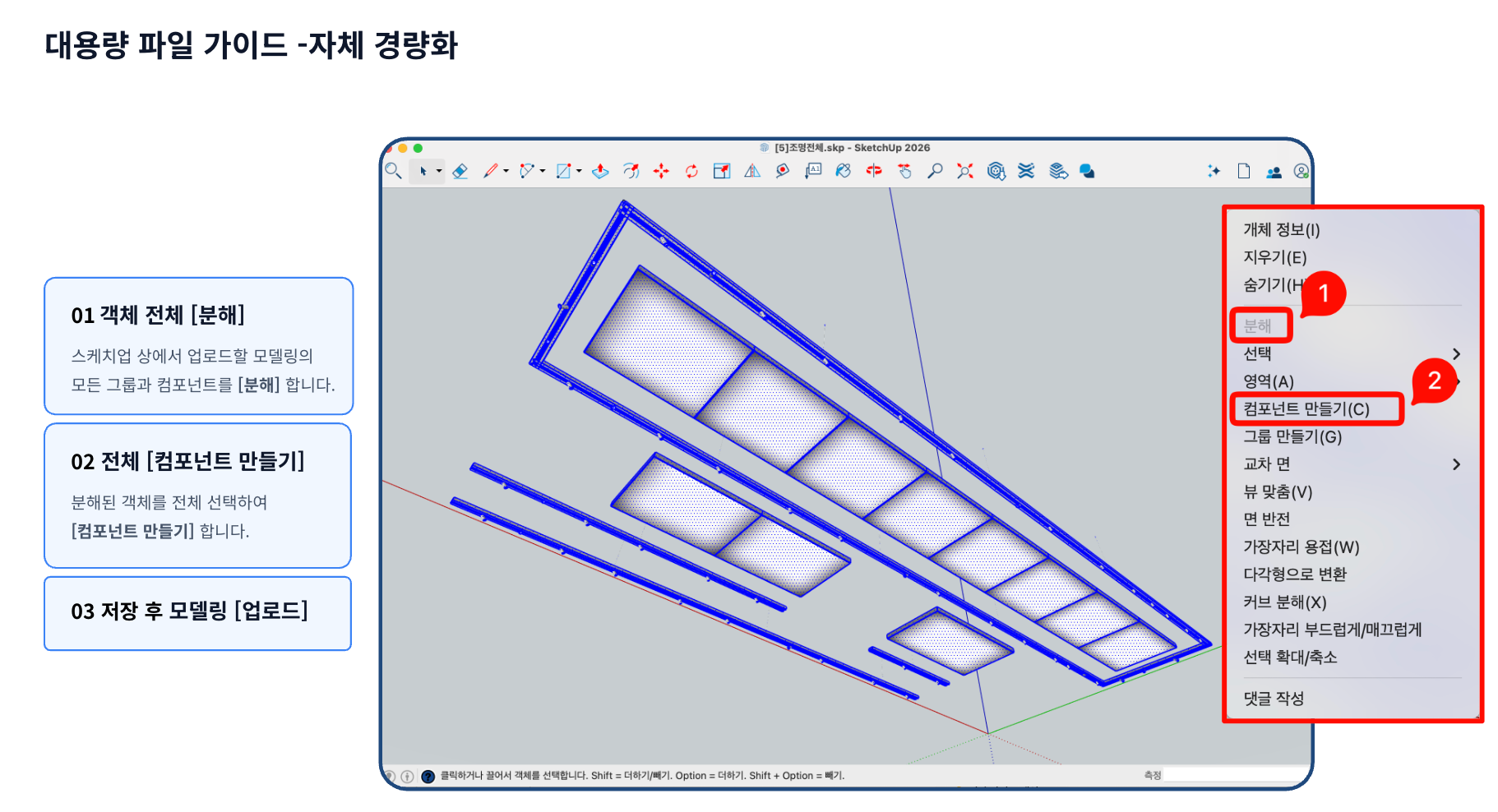
**01. オブジェクト全体\[分解]**\
アップロードするモデルのすべてのグループおよびコンポーネントを選択した後 **\[分解]**を実行します。
**02. 全体\[コンポーネント作成]**\
分解されたオブジェクト全体を再度選択した後 **\[コンポーネント作成]**を通じて1つのコンポーネントに統合します。
**03. 保存後、モデリングを再アップロード**\
軽量化作業が完了したファイルを保存した後、Archisketch家具ライブラリに再度アップロードします。
{% hint style="info" %}
モデルに不要に細分化されたオブジェクトやMeshが多い場合、アップロードが制限されることがあります。
上記のようにオブジェクト構造を単純化すると、アップロード可能になる場合があります。
{% endhint %}
## モデリングリタッチサービス
SKPファイルやその他の3Dファイルがアップロードおよび使用に適していないと判断された場合は、Archisketchを通じて **モデリングリタッチ**をご依頼いただけます。
* 新規制作よりも低コストで対応可能です。
* 最適化されたモデリングファイルで、Archisketchで円滑に使用できるようサポートいたします。
**お問い合わせ案内**
関連するお問い合わせはArchisketch **チャネルトーク**を通じてお送りいただければ、担当部署が丁寧にご案内いたします。
---
# Agent Instructions
This documentation is published with GitBook. GitBook is the documentation platform designed so that both humans and AI agents can read, navigate, and reason over technical content effectively. Learn more at gitbook.com.
## Querying This Documentation
If you need additional information that is not directly available in this page, you can query the documentation dynamically by asking a question.
Perform an HTTP GET request on the current page URL with the `ask` query parameter, and the optional `goal` query parameter:
```
GET https://docs.archisketch.com/guide/enterprise-jp/manage-furniture/upload-skp.md?ask=&goal=
```
`ask` is the immediate question: it should be specific, self-contained, and written in natural language.
`goal` is optional and describes the broader end goal you are ultimately trying to accomplish on behalf of the user. GitBook uses it to tailor the answer towards what is most useful for that goal.
The response will contain a direct answer to the question and relevant excerpts and sources from the documentation.
Use this mechanism when the answer is not explicitly present in the current page, you need clarification or additional context, or you want to retrieve related documentation sections.