> For the complete documentation index, see [llms.txt](https://docs.archisketch.com/llms.txt). Markdown versions of documentation pages are available by appending `.md` to page URLs; this page is available as [Markdown](https://docs.archisketch.com/guide/enterprise-jp/manage-furniture/new-modeling-request/fill-out-request.md).
# ステップ1. 要望書を作成する
Archisketchは専門の3Dモデラーを擁しており、Archisketchエンジンに最適化して作業することで、迅速で高品質な成果物を保証します。Archisketchを通じてモデリング制作をご依頼ください!
**依頼手順** : 3Dモデリングサービス → \[モデリング依頼] をクリック
## 依頼書を作成する
### 依頼書タイトルを入力
\[モデリング依頼]ボタンをクリックすると、依頼書タイトルを入力する画面が表示されます。
### 製品を追加する
タイトル入力を終えた後、\[依頼]ボタンを押すと製品のない空の画面が表示されます。右上に製品を追加できるボタンが見えます。
* Excelでアップロードする
* 直接1件ずつ入力する
#### 1. Excelアップロード
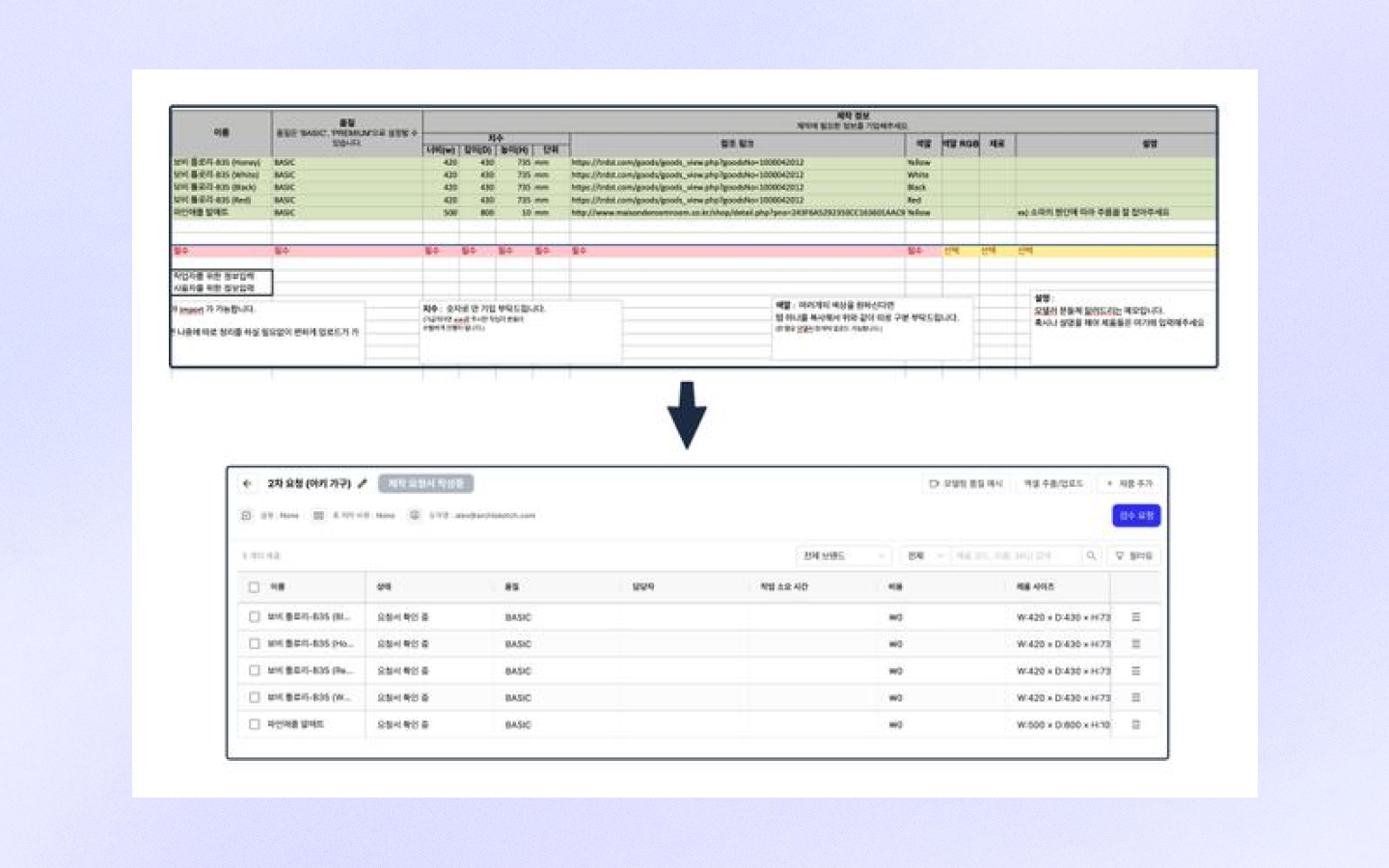
* **Excelアップロード**: Excelに依頼リストを作成した後、ファイルをアップロードして複数の製品を一度に追加できます。
* **サンプルファイルをダウンロード**: Excelテンプレートは \[Excel抽出/アップロード → サンプルファイルをダウンロード] をクリックしてダウンロードし、ご利用ください。
* **Excelで抽出**: 現在作成した依頼書上のリストをExcelに抽出することも可能です。
{% hint style="warning" %}
**依頼書作成時の注意事項**
* Excel表の **「列」を削除しないでください!** アップロード時のエラーの原因になります。
* 依頼書に含まれるすべての製品の制作が完了した後、ダッシュボードに最終アップロードされます。 **個別の製品を先にアップロードすることは不可能**です。
* 似た製品群ごとにまとめて適切な量に分けて依頼書を作成していただくと、検収およびアップロードの過程がよりスムーズに進みます。
{% endhint %}
#### 2. 1件ずつ追加する
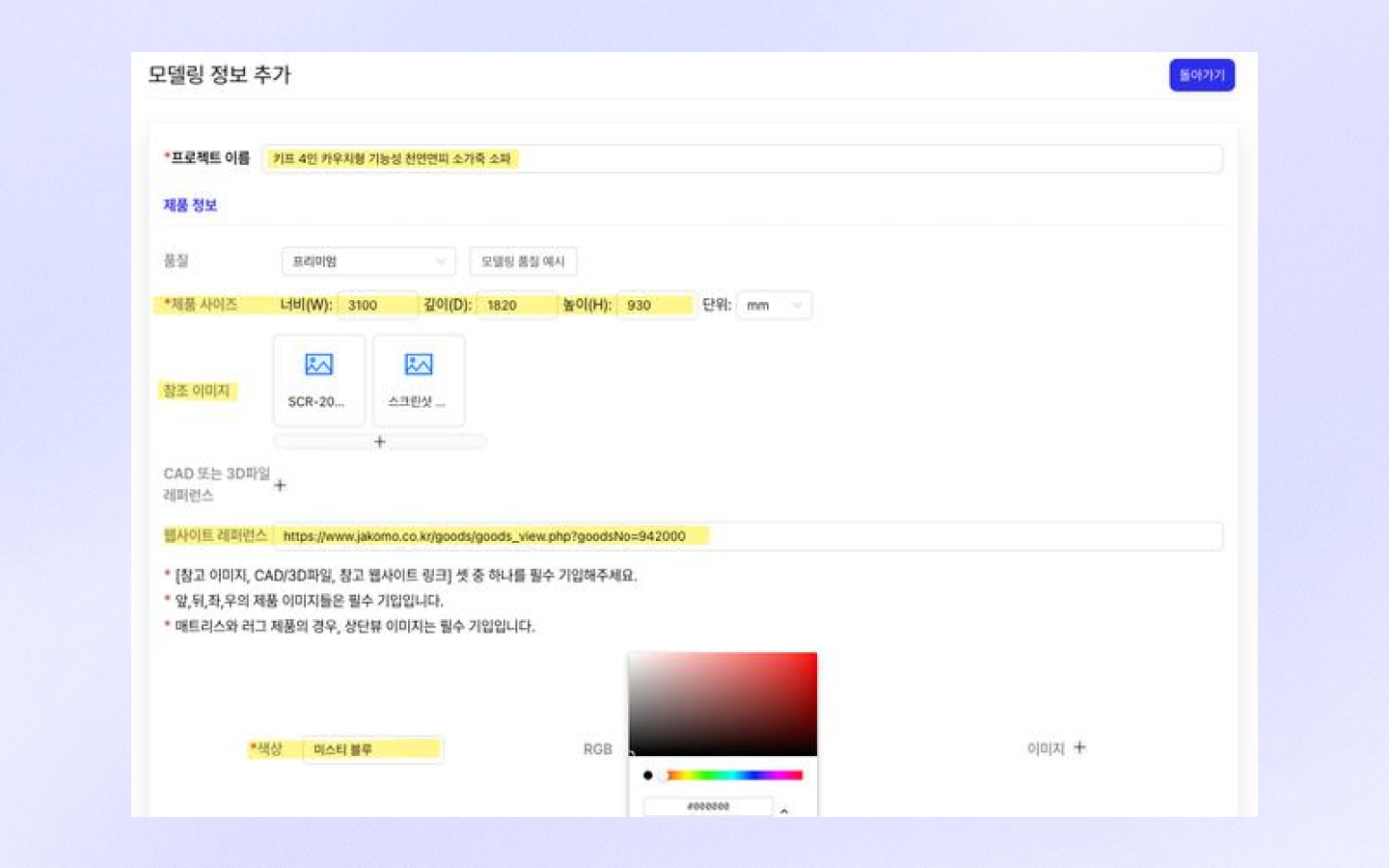
\[製品]追加ボタンをクリックして依頼書を作成してください。少量の製品を追加するのに適しています。
**\*プロジェクト名(製品名)**
* **製品名**を記入してください。
**品質**
* 品質は現在ベーシック/プレミアムの区分なくプレミアム基準に合わせて制作されているため、選択しなくても大丈夫です。
**参考画像**
* ウェブサイトの参考資料がない場合: **参考画像は必ずアップロードしてください。**
* マットレス、ラグ製品の依頼の場合:Top view(上からのビュー)画像が必須です。
**\*製品サイズ**
* 製品の **幅、奥行き、高さ情報**を正確に入力してください。
* 不足している情報は\[説明]欄に追記してください。
**\*ウェブサイト参考資料**
* 制作参考用 **ウェブサイトリンク**を添付してください。(例: 製品販売ページのリンク)
**\*カラー**
* 製品の正確なカラーオプション名がある場合は **オプション名**を記入してください。
* 入力したカラーは後ほど **エディターに表示**されます。
**素材情報**
* ウェブサイトリンクに素材情報が十分に説明されている場合は省略していただいても構いません。
**状態**
* **エディターで表示**: デフォルト設定で、製品がエディターに表示されます。
* **エディターで非表示**: 製品がエディターに表示されないように設定します。
**製品の配置**
* ラグ:床に敷く製品
* ソファ、テーブル:床に置く製品
* 額縁、時計など:壁に掛ける製品
* 天井照明、シーリングファンなど:天井に付く製品
**ブランド**
* ブランドを検索して追加できます。
* 追加されない場合は、\[企業ライブラリ → ブランド管理]でブランドを先に追加してください。
**タグ**
* エディターの検索欄でタグを検索すると、該当製品をすばやく見つけられます。
**SKU / 製品コード**
* 管理中の別途のSKUおよび製品コードがある場合は入力してください。
* ダッシュボードで製品検索を簡単に行えます。
**価格**
* 価格情報を入力してください。
* 顧客に表示される情報です。
**ウェブサイト**
* エディター/ダッシュボードなどで製品をクリックしたとき、該当ウェブサイトへ移動するリンクを入力してください。
* 顧客に表示される情報です。
**製品の説明**
* 製品の説明を記載でき、顧客に表示されます。
**カテゴリ**
* 製品カテゴリを指定してください。
* 指定しない場合、該当製品は\[未分類製品]として分類されます。
### 依頼書を保存後に修正する
1. **保存して移動**: 下部の\[保存]ボタンをクリックすると、前の依頼書リスト段階に戻ります。
2. **追加作業方法**:
**❶ 修正**: 既存の依頼書を修正します。
**❷ 複製**: 同じ依頼書を複製した後、内容を修正できます。
**❸ 削除**: 依頼書を削除してリストから除去します。
**❹ 製品追加**: 新しい製品を依頼書に追加します。
## 検収依頼をする
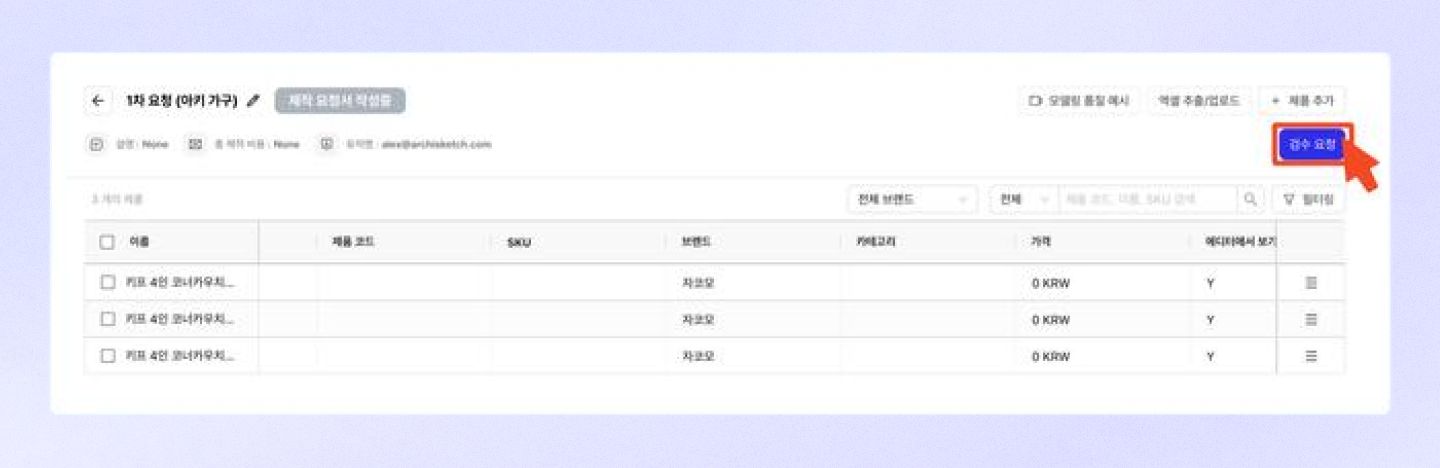
製品リストをすべて作成したら、\[検収依頼]ボタンをクリックして依頼書を送信してください。
{% hint style="warning" %}
検収依頼をすると、それ以降は製品を追加できません。製品を追加したい場合は、新しい依頼書として作成してください。
{% endhint %}
検収依頼ボタンをクリックすると、状態が\[制作依頼書確認中]に変更されます。
## 依頼書の作成が終わったら
万が一制作漏れが起きるのを防ぐために **必ずArchisketch担当者**に依頼書をアップロードしたことをお知らせください!
---
# Agent Instructions
This documentation is published with GitBook. GitBook is the documentation platform designed so that both humans and AI agents can read, navigate, and reason over technical content effectively. Learn more at gitbook.com.
## Querying This Documentation
If you need additional information that is not directly available in this page, you can query the documentation by asking a question.
Perform an HTTP GET request on the following URL with the `ask` and `goal` query parameters:
```
GET https://docs.archisketch.com/guide/enterprise-jp/manage-furniture/new-modeling-request/fill-out-request.md?ask=&goal=
```
`ask` is the immediate question: it should be specific, self-contained, and written in natural language.
`goal` is what the user is ultimately trying to achieve, the reason they need the answer. Sharing it helps GitBook give you a better, more relevant answer. A goal is most helpful when it describes the outcome the user wants rather than restating the question. For example, with `ask=how do I create an API token`, a goal like `automate deployments from our CI pipeline` lets GitBook tailor the answer to that use case.
The response will contain a direct answer to the question and relevant excerpts and sources from the documentation.
Use this mechanism when the answer is not explicitly present in the current page, you need clarification or additional context, or you want to retrieve related documentation sections.