> For the complete documentation index, see [llms.txt](https://docs.archisketch.com/llms.txt). Markdown versions of documentation pages are available by appending `.md` to page URLs; this page is available as [Markdown](https://docs.archisketch.com/guide/enterprise-jp/manage-finishing/upload-finishing.md).

# 仕上げ材アップロード

基本提供される仕上げ材のほかに、自分で保有している仕上げ材の画像をアップロードしてプロジェクトに使用できます。

## 1段階。ファイルをアップロード

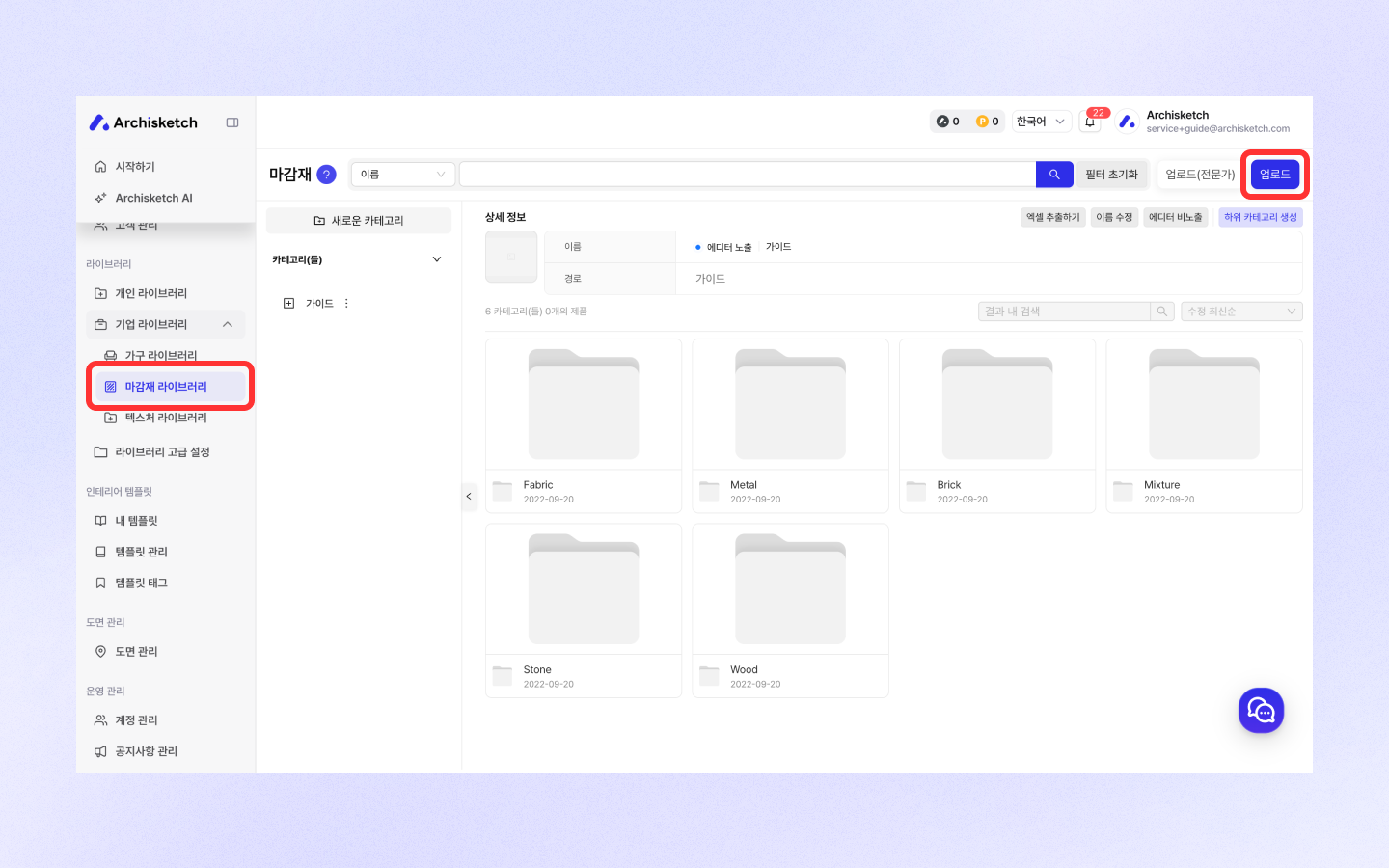
**経路：** ダッシュボード > 企業ライブラリ > 製品 > 仕上げ材 > アップロード

1. **「アップロード」ボタン**をクリックします。

![](/files/61fd184e047ce851898d1226144c3cd544ae27fa)

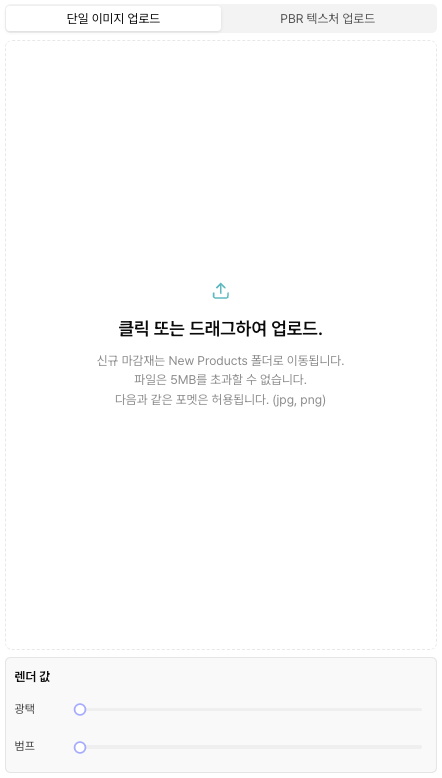
2. 準備した仕上げ材 **画像ファイル1枚**をアップロードしてください。

   * 「画面をクリック」または「ドラッグ＆ドロップ」に対応
   * **対応形式：** JPG、PNG
   * **容量制限：** 5MB以下

   <div data-with-frame="true"><figure><img src="/files/ecaf8b3205e7c7deda1c64204ae2e5c3d6e1fac0" alt=""><figcaption></figcaption></figure></div>

## 単一画像アップロード vs PBRテクスチャアップロード

<table><thead><tr><th width="127.29296875">項目</th><th width="280.7109375">通常アップロード</th><th>専門家向けアップロード</th></tr></thead><tbody><tr><td>アップロードするマップ数</td><td>1個（BaseColor）</td><td>最大5個（Albedo、Normal、Roughness、Metalness、Height）</td></tr><tr><td>自動補正機能</td><td>提供（Roughness、Normalを自動生成）</td><td>未提供 – ユーザーが直接アップロード</td></tr><tr><td>結果物の品質</td><td>基本レベル</td><td>高品質なPBRレンダリングが可能</td></tr><tr><td>推奨対象</td><td>一般ユーザー</td><td>3D専門家およびデザイナー</td></tr></tbody></table>

## 2段階。属性値を設定する

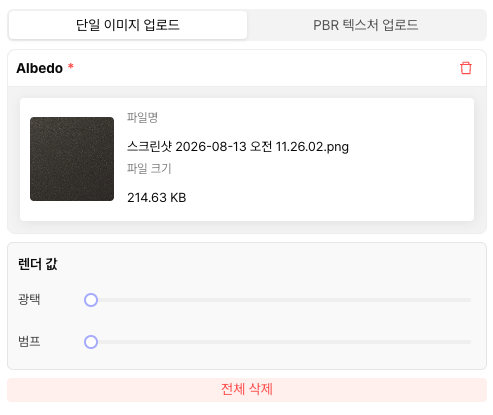
画像をアップロードすると、属性設定画面に移動します。

### 製品情報 - 仕上げ材

{% tabs %}
{% tab title="単一画像アップロード" %}

<figure><img src="/files/653eb60a8d89c05a9f04ea1e9e1b8b102f30f9d8" alt=""><figcaption></figcaption></figure>

**バンプ**

* 表面の **凹凸の程度**を設定します。
  * `1` = 平ら
  * `10` = 表面が **よりでこぼこして粗く** 表現される

**光沢**

* 表面の **光沢の程度**を設定します。
  * `1` = 光沢なし
  * `10` = 非常にツヤツヤ
    {% endtab %}

{% tab title="PBRテクスチャアップロード" %}

<figure><img src="/files/e99c019bb4d0637cabc11cf2656aedba1b42e3c2" alt=""><figcaption></figcaption></figure>

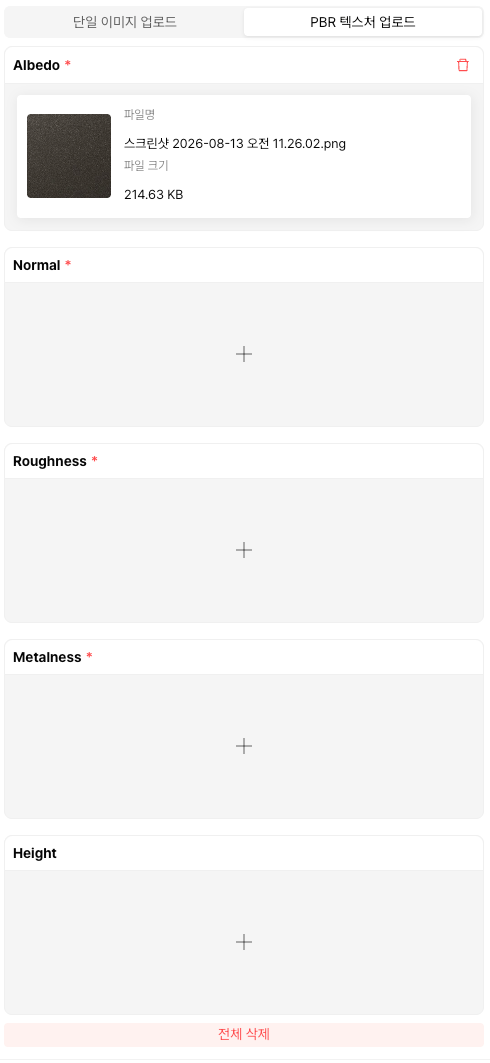
* **最初にアップロードした画像はAlbedo(BaseColor)** マップとしてアップロードされます。
* **対応ファイル形式**: `.jpg`, `.png`
* **ファイル容量制限**: **5MB未満**
* **ファイル名の規則**：各マップの用途を明確にするために、例： `materialname_albedo.png` という形式の使用を推奨します。

### Albedo（BaseColor）

* **役割**：表面の基本色を表現します。
* **特徴**：光や影の情報が含まれない純粋な色の情報

### Normal

* **役割**：光の反射方向を制御して、細かな表面の質感を表現
* **特徴**：RGBチャンネルを使用する青/紫系のマップ

### Roughness

* **役割**：表面の粗さおよび反射率を制御
* **特徴**：白（粗い）〜黒（滑らか）の間のグレースケールマップ

### Metalness

* **役割**：金属かどうかを制御
* **特徴**：通常0または1で表現される白黒マップ

### Height

* **役割**：表面の高低情報を表現して立体感を強調
* **特徴**：グレースケールマップ（Normalマップと併用すると、さらにリアルな効果）

{% hint style="warning" %}
すべてのマップには **タイルリング（Seamless Texture）** が必ず適用されている必要があります。
{% endhint %}

### **マップの作成および抽出方法**

#### 推奨ツール

* Adobe Substance Painter
* Adobe Substance Designer

#### 作成時の注意事項

* すべてのマップにはタイルリング表現が適用されている必要があり、非タイルマップは予期しないレンダリング結果を引き起こす可能性があります。
  {% endtab %}
  {% endtabs %}

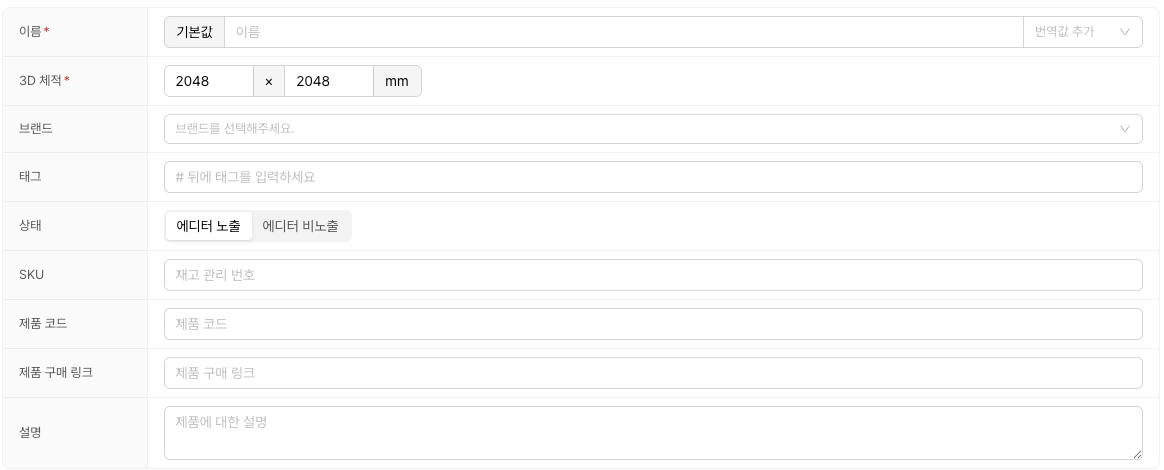
### **製品情報 - 基本情報**

<div data-with-frame="true"><figure><img src="/files/e242b8f22a604b6fabda82dc2b878e67403e719b" alt=""><figcaption></figcaption></figure></div>

**名前**

* エディターに表示される製品名を入力してください。

**3D体積**

* 画像のサイズを入力してください。
* 設定したサイズのままエディターに適用されます。

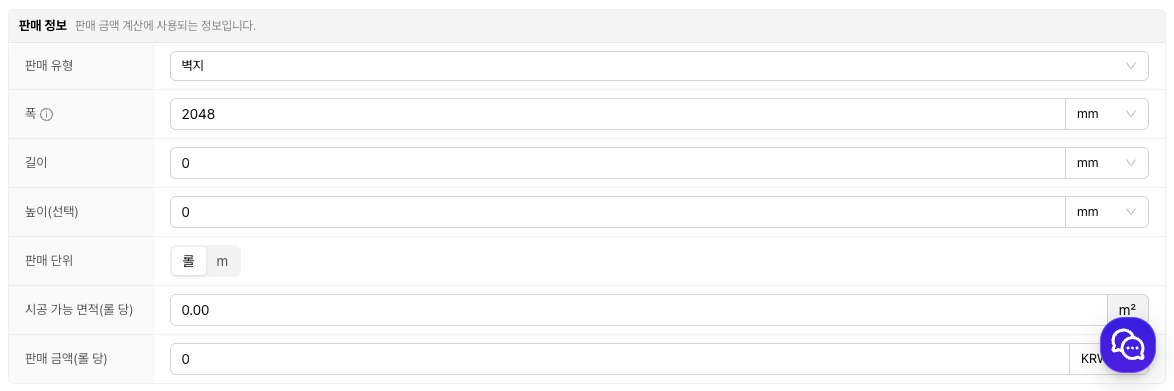
### **販売情報**

<div data-with-frame="true"><figure><img src="/files/e8d3e7674a2c26c7608d9b589c625af965d53263" alt=""><figcaption></figcaption></figure></div>

必要であれば商業情報まで一緒に入力しましょう。販売価格、販売単位、適用（施工）面積などを入れると、見積・算出にすぐ活用できます。

{% hint style="info" %}
ワンポイント — 販売価格・単位・適用面積を最初のアップロード時に正確に入力しておくと、あとで見積書で面積当たりの金額が自動計算され、作業が減ります。
{% endhint %}

そのほか必要な情報がすべて記載されていれば **アップロード** ボタンを押してください。

提出完了した項目は `仕上げ材 > 未分類製品`として保存されます。

## 3段階。カテゴリを移動する

「未分類製品」にある項目は **エディターに表示されません。**

カテゴリを必ず設定してください。 **カテゴリの設定方法は家具製品と同じ**です。


---

# Agent Instructions
This documentation is published with GitBook. GitBook is the documentation platform designed so that both humans and AI agents can read, navigate, and reason over technical content effectively. Learn more at gitbook.com.

## Querying This Documentation
If you need additional information that is not directly available in this page, you can query the documentation dynamically by asking a question.

Perform an HTTP GET request on the current page URL with the `ask` query parameter, and the optional `goal` query parameter:

```
GET https://docs.archisketch.com/guide/enterprise-jp/manage-finishing/upload-finishing.md?ask=<question>&goal=<endgoal>
```

`ask` is the immediate question: it should be specific, self-contained, and written in natural language.
`goal` is optional and describes the broader end goal you are ultimately trying to accomplish on behalf of the user. GitBook uses it to tailor the answer towards what is most useful for that goal.

The response will contain a direct answer to the question and relevant excerpts and sources from the documentation.

Use this mechanism when the answer is not explicitly present in the current page, you need clarification or additional context, or you want to retrieve related documentation sections.